erudipedi

  • Subscribe to our RSS feed.
  • Twitter
  • StumbleUpon
  • Reddit
  • Facebook
  • Digg

Sunday, 13 August 2017

Android phones with long lasting Battery life 2017

Posted on 11:18 by sud
Hello Erudites we are bringing you the top Android phones with long lasting battery, first of all buying a phone with a strong battery is awesome. Nobody wants to buy an Android phone that runs down easily and disappoint in the time of need. Though if a cell phone is been operated constantly then you need to charge it constantly than usual

In the modern era now the growing use of 4G internet, social media, Gaming and Video streaming with your Android phone doing all those features listed rapidly consumes your phone battery and to enjoy those features in your phone you need an Android phone with long lasting battery.

Battery life is one of the most important consideration before purchasing an Android phone. Battery innovation has become much stronger and awesome than the previous years. As Android phones are charging quicker as well as lasting longer on one charge but if the battery doesn't last long as you want then we guess you can check out the high end smartphones you can purchase that has Superior battery life.

1) ZTE NUBIA N1:


Nubia N1 lunched in December 2016 (ZTE NUBIA) is one of the latest and comes with solid and long lasting battery, besides the battery? There are other features as well that are hard to get in an Android phone at this price range of $180. It comes with a rear and front camera of 13MP that makes it Superior from other $180 devices you can click some astonishing pictures and capture exciting moments to make them memories

2) BLACKBERRY KEYONE:

Blackberry stormed with this long lasting battery life device, blackberry keyone might just be the most unparalleled Android phone available in the market now. Not just that it has a touch screen with a physical keyboard all together. Keyone is not just famous for it's beautiful look and design but it offers a great battery of 3505mAH capacity the device offers a rear camera of 12MP and a front camera of 8Mp for taking awesome selfies. You can play exciting games this device. The phone comes with 3GB RAM this is a phone to consider if you want classic battery life and the same time.

3) LENOVO P2:

Lenovo is well known and trusted when it comes to Android phones. Lenovo p2 boasts a monster battery of 5100mAH capacity however this isn't the only good thing about the device. Lenovo p2 is made in two variants the one with 3GB RAM and other with 4GB RAM you can easily do multitasking on the device without thinking that it will get stuck. The finger print unlocking system keeps your Lenovo p2 safe

4) SAMSUNG GALAXY S7 EDGE:

Without exaggerating Samsung Galaxy S7 Edge is one of the best Android phone you can get with a bunch of some top notch features. The battery of this device is 3600mAH. Under normal circumstances the battery can last a day long with full brightness on and performing different activities e.g Chatting, Gaming and Video streaming it can last for at least 6 hours and 40 minutes. The look of the device is also very Attractive.

NOTE:

There is more 2017 Android phones with long lasting battery life but you should consider these options if you want to enjoy your phone without plugging in to charge when operating 
Read More
Posted in Reviews | No comments

Sunday, 25 September 2016

How to create whatsapp bot auto responder like duta

Posted on 23:45 by sud
Hello Erudites Are you sometimes not next to your phone or probably busy with important things and you got message from your friend but you can't type , but want to reply to WhatsApp messages? WA chat bot does this job for you like duta. It will automatically respond to predefined messages, which contain some words or equal a message. You can set custom responses for different messages. WA chat bot also known as AutoResponder.
I think you all know duta , Duta™ is your group messenger for obtaining latest news, sports, entertainment, devotional, finance and interactive services.

Requirements
1. Rooted Mobile
2. WA Chat Bot Lite (Download)
or
WA Chat Bot Pro  (Download from playstore.)
Simple steps:
1. First Download WA Chat Bot and install.
2. Open this app and allow Root access.
3. Now Click on Rules and add your rules or auto reply messages.
4. Select message which has to be answered (or * for all incoming messages which can also be specified by contact)
5. Select an answer for this message
6. Select contacts which will get responses
7. Now Click Enable WA Chat Bot.
8. Done, Now Whatsapp bot started.

FEATURES
FREE VERSION:
• Automate your WA and give automatic replies
• Automatically replies to custom/all
WhatsApp messages with predefined texts
• Responds if message equals or just
contains some words
• Possibility to set contacts who will
get responses for each message
• Possibility to answer all received
messages (from all/from single contacts)
• Answer replacements like %time%
for current time

PRO VERSION:
• Add infinite responses for custom messages
• Add multiple responses (Send all or a random one)
• “Answer if message contains”
option
• “Answer delay” option
• “Send Blue Ticks” option
• Ad-Free

NOTE!!

* We are not responsible for any wrong answered messages and damage that may occurs with your device or WhatsApp™ account from using this app.
* If you don't know what root is, than you probably don't have root. WhatsApp™ is a registered Trademark of WhatsApp Inc.
...If Any Problem Comment below.
Read More
Posted in Whatsapp | No comments

Wednesday, 21 September 2016

How to play High end(HD) games with Gl tool (Graphic optimizer)

Posted on 00:22 by sud
Hello erudites! Have you for any common reason had an issue playing HD game probably because you have low budget to get a smartphone that support high end game like 9mm, GTA San andreas, NBA 2k16. Don't worry because the android developers has heard your problem and developed an app that can enable you to play HD games in your android device.
Here comes gl tool, an android app that enables you to play the resolution and graphic rendering and optimization of Games and apps. It will allow you to play games which requires higher specs or rather play games with lesser lags and force close. If you are familiar with what this app can do, it might be you have heard of Chainfire3D, but, this one supports any android versions starting from android 2.2 and above with lesser issues.
Disclaimer: Use this app at your own risk for we won't take responsibility for any damage you encounter with your device.

Make sure your smartphone is rooted and also backup your stock ROM incase if anything goes wrong.
Note that this app works well on jellybean device for I have been using it to play HD games with my techno p5

1. Download and install GLTools from here

2. Open GLTools, read and understand the check list below before checking all the check boxes. Select Install. Wait for your device to reboot. There will be an uninstaller of the GLTools flashable through custom recovery, it can be found on your SD card.
3. Again, open GLTools then select the Game you want to play.
4. Check Enable custom settings for this

Here's the tweaking part
5. Check Force 16 bit rendering. (it reduces lighting and shading effects but not much a biggie in the graphics)
6. Check Optimize GLSL shaders. (for optimizing OpenGL shading responsible for color, texture, structure)
7. Enable and set Downscale texture as what you like. (It reduces the texture therefore, lesser lag)
8. You may want to Use fake GPU info. (Can also improve game graphics quality and performance)
9. Now, it's done. Play any games you wanted.
How to completely uninstall GLTools?
1. Simply reboot to custom recovery.
2. install zip from SD card then choose uninstall-gltools.zip
3. Wait and GLTools will be uninstalled.
Read More
Posted in Tutorials | No comments

Tuesday, 20 September 2016

Get unlimited airtime with the new Nairabox App

Posted on 05:20 by sud

Just like the slide airtime that was introduced earlier to us and you probably knew how we used it to get free credit, although its no longer popular now but its still working though. Today we are introducing to you, the Nairabox app. Get free airtime with this app and share with your friends and folks... Its working 100% and I am already enjoying it. So don't dull grab it and start earning. The app has been cracked now you can get 1000naira free airtime when you invite your friends instead of the normal 100naira
How to earn with nairabox
Download and install the nairabox app from here
Create a new account(don't login with your previous account because you need to enter another invite code to get 1000naira)
Register and insert YSYS07 or HENF005
or you can as well use a friends Invite code
Immediately after your registration verify your email and go back to nairabox app
Done! Your 1000airtime will be smiling at you
You can repeat this steps numerous times to get free airtime .
Don't forget to share
Read More
Posted in Browsing | No comments

Monday, 19 September 2016

Latest: How to use nairabit vpn app for unlimited free browsing

Posted on 14:16 by sud

Its been a while we surf the internet free, people have been waiting eagerly for any available free browsing to rock.
Today I am introducing the nairabit VPN app to you, this app was modded spontaneously and the good thing about it is that it does not require any configuration or setup before connecting.
All you have to do is to have an etisalat or glo simcard then download the nairabit VPN app and start blazing the internet like mad.
I have tested this cheat and its working perfectly with 3G network, and it seems itscapped at 60-70mb per day atleast for now. So after exhausting the data capped you have to wait for the next day. The modders did a great job in it.

NOTE: This cheat is free it does not require any airtime, you can browse the internet with 0.0k using N-VPN

How to use nairabit with pc
To use the Nairabit app with your pc you will need two apps which are Pda net and Foxfi key.
First of all download pda net for Mobile and PC then install them after that download the Foxfi key for only mobile. After that install it, then connect the nairabit vpn app when it is connected. Go to settings then go to developer options then enable your USB debugging after that open your pda net tick the Activate "USB Mode", then go to your PC and connect it, then start surfing the net with both your PC and Android device.
Also remember to tick I trust this application and tunnel whole device when asked.
Download the nairabit VPN from here and start blazing.
Read More
Posted in Browsing | No comments

Saturday, 17 September 2016

How to browse the Internet with your WhatsApp megabyte

Posted on 01:13 by sud
Hello guys today I will show you how to browser the internet(any website) with your WhatsApp MB. I discovered this trick not long ago so I am going to share it with you guys. Its kind off not proper to browser the internet with the whatsapp bundle you bought but it comes in handy when you desperately need to search something important online. So let's start .
First Download and install any of these VPN app, syphon, psiphon, Tweakware etc here

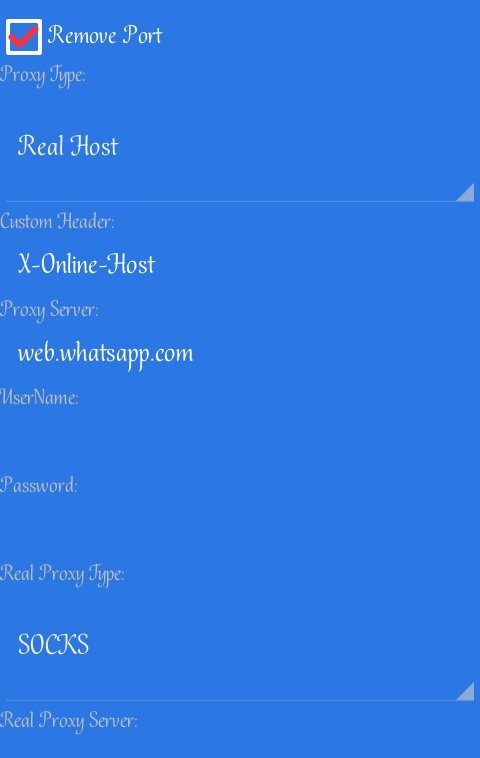
Launch the app and configure below
Handler menu
Tick Remove port✅
Proxy type: real host
Proxy server: web.whatsapp.com
Real proxy type: SOCKS
Real proxy port: 80
Then save…
Goto settings(inside the app: syphon, psiphon etc) and set the following
Connect through an HTTP proxy✅
Use the following settings ⏺
Host address: 10.199.212.2
Port:8080.
Then click back
PHONE SETTINGS
Name: Erudipedia
APN: Web.gprs.mtnnigeria.net
APN type: Default
Proxy:127.0.0.1
Port: 8080
Then save it and connect your VPN
Enjoy!!!
NOTE: this steps is only working on Mtn simcard
Read More
Posted in Browsing | No comments

Friday, 16 September 2016

Easy Steps to Create WhatsApp Group Invite Link

Posted on 03:49 by sud
The newest feature of WhatsApp allows its users to Create WhatsApp group invite link so that people can easily join your group in WhatsApp once the click on the generated link. Today I will show you how to easily create WhatsApp group invite link with GB WhatsApp.
Advantage of this trick
* You can join a group without the admin permission
* Ability to add anyone to the group without having to save his/her number in phone book
* People can join using the group invitation link.
As you can see, the advantage is extremely good so if you which to know how to create group invite link, keep reading below.
Steps to create WhatsApp group invite link
* Open the GB WhatsApp in your phone
   Must read: GB WhatsApp v4.81 apk latest version
* Click on Settings option> Group info
* Tap on add member option
* Click on invite group via link
* Now wait a moment for the group link to be created
* Done!
Now open the link and share with your friends.
How to join WhatsApp group via group invite link
* Copy the invite link and browse it via any suitable browser you prefer
* Now select your WhatsApp messager
* It will ask you to join the group
* Click on OK and you're done.
You can also use WA prime to create a group invite link
NOTE: This method may not work for some users so its recommended you use the first one.
* Uninstall your WhatsApp from your device and download WA prime apk (search for it in Google web)
*  After downloading, open WA prime app and create an account
* Now select the group which you want to generate  invite link
NOTE: You must be an admin in a group in other to create a WhatsApp invitation link.
* Once you open the group, click on group info option then click on + (Add member) option
* Now you will see "invite to group via link" just click on it
* Once you click on it a link will be create just copy and share with your friends.
Read More
Posted in Whatsapp | No comments
Newer Posts Older Posts Home
Subscribe to: Posts (Atom)

Popular Posts

  • Top Best TV-Shows on Netflix
    There are a lot of good TV shows on Netflix The bread-and-butter of the Netflix service, however, is its original programming. If you’re try...
  • Best Cool Gamepads for smartphone
    This is the easier way to become a gamer with gamepads you can now play games in your smartphone comfortably. Handheld gaming has come a lon...
  • Android phones with long lasting Battery life 2017
    Hello Erudites we are bringing you the top Android phones with long lasting battery, first of all buying a phone with a strong battery is aw...
  • Best Virtual Reality (VR) Headsets of 2017
    Virtual Reality is here and is a fascinating way to travel Using nothing more than the power of technology with a headset and motion trackin...
  • GB Whatsapp v4.81 apk lastest version download now
    GBWhatsapp is a mobile phone application that allows users to operate two whatsapp account in their mobile phone without causing any technic...
  • Brief Review of the GB whatsapp for android
    Good morning erudite readers! Today we are going to review the GB WhatsApp app in other to know if its actually good and more convenience t...
  • How to play High end(HD) games with Gl tool (Graphic optimizer)
    Hello erudites! Have you for any common reason had an issue playing HD game probably because you have low budget to get a smartphone that s...
  • PixelLab apk for android: The best way to add text to your pictures
    Hello erudites! Today I bring to you pixelLab. The best application that enables you to easily draw, add simple and 3D text and stickers, an...
  • Tips for creative Ads on Facebook
    With Facebook Ad you can reach an audience more likely to be interested in your products and services. Have you asked yourself why your prod...
  • ChatSim: The best way to go online and communicate with your friends
    Hello erudites! Have you ever heard of ChatSim? the world's first SIM card that lets you connect your ChatApps wherever you are. For ju...

Categories

  • Applications
  • Browsing
  • Facebook tips
  • Gaming
  • Recommended
  • Reviews
  • Technology
  • Tutorials
  • Tv-shows
  • Whatsapp

Blog Archive

  • ▼  2017 (8)
    • ▼  September (4)
      • Top Best TV-Shows on Netflix
      • Tips for creative Ads on Facebook
      • Best Cool Gamepads for smartphone
      • Best cool video games of 2017 so far
    • ►  August (4)
  • ►  2016 (13)
    • ►  September (13)
Powered by Blogger.

About Me

sud
View my complete profile